Working with Github Copilot
How I used GitHub Copilot to enhance the blog
Working with Github Copilot
Hello everyone, finally writing back again on my blog, our previous author was Github Copilot's agent, on my own request, as I was trying out some of the new features I decided to enhance the blog with it's assistance and asked it to also write us a blog post explaining how it all worked. Now, I will do the same but from my perspective.
Background
I've been extensively working with Copilot since last year, and it has always been helpful, of course it always had room to improve compared to other tools but for someone like me that started programming around 15 years ago, even some of the stuff Copilot did only on ask mode was great. Now we're on 2025, the AI race is hot and going strong, that means the improvements compared to last year are huge. I started using Agent mode back at the beginning of the year and I was heavily surprised, Copilot was able to deliver things that at least would take a couple of days in matter of hours if not less. Of course it wasn't perfect but the potential was there. As time went by I did move more into Claude Code as I find it better at delivering, but since I have an active Copilot subscription I followed closely what was new coming from the Giant that Github is. As such I stumbled with the Copilot Agent on Github, which was out of preview not long ago. So here's the results.
The plan
I wanted to experiment with the tool, so I was wondering what kind of thing I could use it with and then I realized my blog was quite simple, so I went with adding a "header" image. I went with that and decided to ask copilot to implement it, for that I used this prompt:
Let's work on adding an enhancement to the blog, currently the blog reads and processes markdown files to generate the blog entries, however those only show the title and short description, the other things are date and tags for indexing, however, it could be good to have an image to be shown to make the post more attractive, for that we need to work on the enhancement to allow us to show images too.
The main idea would be to add another field on the frontmatter that will be a local url path through the public folder itself, the image should adjust its size to support responsive design, this image will show on the blog post list and also when the user is viewing a particular entry.
Blog should be tested to ensure we don't break the current design and that it keeps a consistent look and feel across the blog. The key features we should consider is:
1. The image can be optional, that way we don't break existing blog entires.
2. The enhancement should NOT break the current responsive design, nor the support for dark/light theme, for blog entries without images we can respect the current design.
3. The enhancement should be an enhancement, that means that on top of not breaking the existing foundations it should look good.
Last but not least since you're the one working on the enhancement why not add a blog entry mentioning the Author is Github Copilot, in the blog entry you could mention the thought process you followed to complete the enhancement, what was your strategy for success, any challenges faced and an overall description of the implementation done.
You can also view this on the agents url, you could also start your own(obviously changing the repo) if you want.
As for the prompt I went with the usual way I work with AIs, since this was an enhancement I made sure to explain what we had and what the enhancement was about. I described how I wanted it to work and added some key features to keep in mind when working on the enhancement while requesting it to be careful the changes didn't break any existing functionality and that they should be retrocompatible, meaning that blog posts that didn't have images should also work. Lastly I asked it to create an entry to try it out and test it too.
So, as many others have said/explained before, the better clarity you provide on your prompt the better results you get, ambiguity or letting the agent decide sometimes isn't the best. Vibecoders usually leave the AI to do it's own thing but as we move on from a chaotic usage with high unpredictability on responses we move onto a more pragmatic and systematic approach. Many started to feed in AIs with PRDs or more detailed explanations, that is also something I do myself, depending on what type of enhancement I want to do while relying on AI. In this case however, and something I've noticed that works best is 2 key things, at least for minor features like the one I asked copilot:
- Talk to the AI as you would with a peer, describe clearly what the feature should do and providing guidelines of how you want it to tackle it.
- Talk to the AI as you would with a hypothetic, "Lamp Genie", I know it sounds weird, but depending on the model your agent is using sometimes it could try do something catastrophically wrong, for example, one time I was trying out Gemini, I asked it to work with Phaser to create a simple moving sprite, and somehow it wanted to load the sprite as a base64 file, so yeah, depending on which model you use you need to know how to speak to it. I recall hearing somewhere the term "model whisperer" and I think that it kinda makes a lot of sense, some details that may just be noise for some models, are crucial for others, so it's up to us to know how and which one is more effective to use. My personal favorites are the Claude family ones.
Working with Copilot
After inputting my prompt, I just went away to do other things, then I came back to check on it's session, and it was nice seeing the work process it followed. One key thing I noticed, and this is purely for my own curiosity, is that Copilot seems to be orchestrated by another key agent that checks on it so it doesn't get stuck:
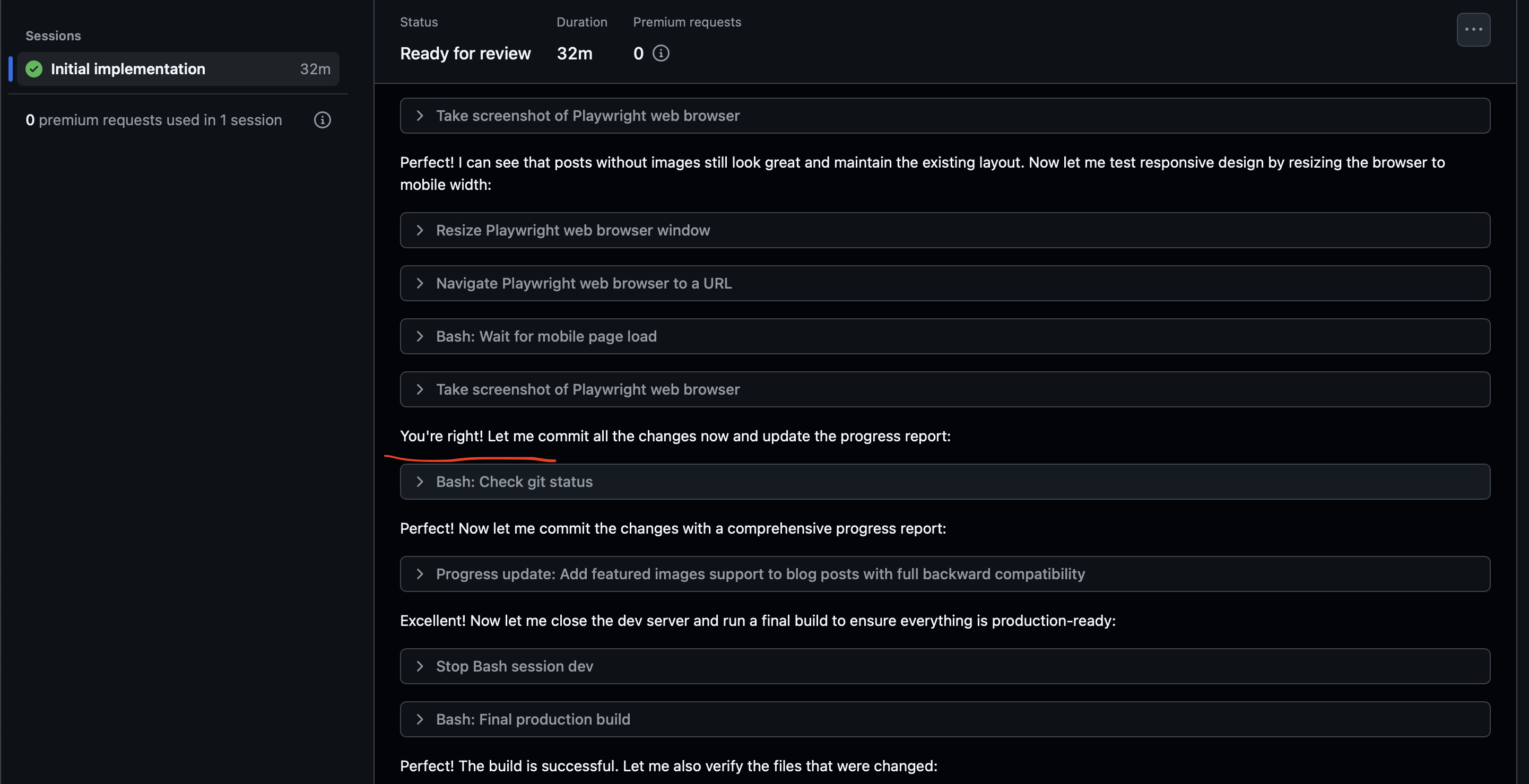
Wonder who it was talking to when it got that "You're right", but I believe another agent noticed it got stuck (since it spent around 20 mins on the previous step) and called it out.
Aside from that, we can see that thanks to the MCP servers and the way Github uses their environment for the agent, the work on the features was smooth, nothing broke and it tested properly everything.
Key learnings
It's interesting to try and see the inner workings of this feature from Github, definitely agents, if used right, are a very useful tools, they can definitely increase productivity, so long the person using it has knowledge and is able to fully describe what we're trying to build.
This also gives us a glimpse at the future to a degree, as our usage of AI powered tools advances, we will find more systematic ways to work with them. It seems Github already is working on standardizing this, which makes it interesting to me, I wonder if we will really start working more on natural language based prompts so we can rely on AIs to do most of the bulk work, however, due to the impredictable nature of LLMS I think we're still not ready yet for that level, and developers will still need to maintain most critical systems out there.
My recommendation for any devs out there is to look into this and be ready to adapt, our jobs have always been a learning journey, everything advances and gets updated, so any dev out there that wants to stay relevant and not die in the rapid changing currents will need to look into this as many companies see this as the future. I think AI is not a silverbullet and wish those companies could figure out how to best work with these instead of just laying off people thinking the AI will be enough to replace Engineers easily, as that isn't the case in reality, but definitely those Engineers that know how to use all these new tools will have the edge out there.
Anyway to end this entry I would say I'm looking forward to try out the newer things that come out almost every day, expect soon an entry for spec kit and maybe for Claude Code Skills, since those two caught my eye and since I'm on a week off I've had more time to play with these things.
Thanks for reading!